

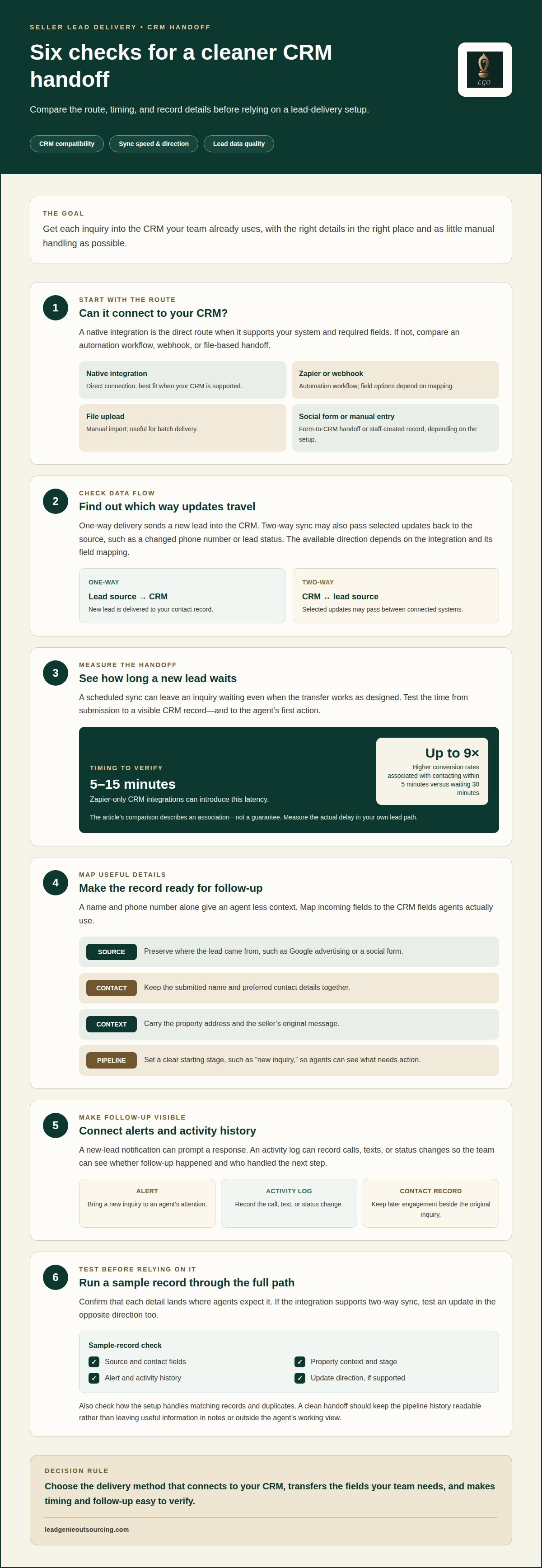
A native integration may not be the easiest option if it does not connect to the CRM you already use. For seller leads delivered to your CRM, a direct integration is the simplest route when it supports your system and the fields you need. If it does not, an automation workflow may bridge the gap.
It makes sense to look beyond whether a connection exists. Leads need to arrive promptly, reach the right place, and include enough detail for follow-up. A connection that drops key information or needs constant attention can add work instead of reducing it.
This comparison breaks down native integrations and Zapier by CRM compatibility, sync speed and direction, lead data, and upload options. You’ll see what each setup can handle, where the trade-offs show up, and how to weigh about six common ways to get seller leads into your system. The goal is a clean handoff, so your team can act on the lead instead of chasing its details.
Key Takeaways
- Choose a lead delivery method based on whether it connects to your CRM and carries the fields your team needs.
- Compare sync direction and speed, not just whether an integration exists.
- Native connections and Zapier workflows each have trade-offs in setup, flexibility, and data flow.
- Check how leads are added, updated, and handled when a direct CRM connection isn’t available.
- Match the provider’s lead qualification and delivery process to the way your team manages seller conversations.
Easiest seller lead providers for CRM delivery
The most straightforward providers connect lead capture directly to your real estate CRM through a native integration. Others use an automation workflow, a webhook, or a scheduled file upload. Ask which route delivers each lead, which fields transfer, and whether new activity appears in the contact record.
Real estate lead generation services can deliver seller inquiries directly through a native CRM connection or supported automation. For example, a social media form can create a contact, add its source, and trigger an alert when the connection is configured to do so.
Lead arrangements vary by provider and agreement. A seller lead may be exclusive, shared, or sold on a pay-per-lead basis; confirm the model, duplicate policy, and replacement terms in writing before purchase.
For consent and disclosure records, look for the lead source, capture method, timestamp, and any consent language shown to the seller. Requirements depend on the campaign and contact method, so check TCPA and DNC questions with your attorney.
Measure conversion and return on investment by tracking each lead from intake to outcome. For example, compare qualified conversations and closed deals with the total spend for the same lead group, using CRM stages and activity logs to trace follow-up.
Before buying, review how complaints, duplicate records, invalid contact details, and opt-out requests are handled. For social media leads, map form fields to CRM fields, then set an alert and a follow-up sequence for inquiries that do not receive a response.
| Delivery option | CRM setup | Lead detail | Best fit |
|---|---|---|---|
| Native integration | Direct connection | Mapped fields and activity | Supported CRM |
| Zapier or webhook | Automation workflow | Depends on field mapping | Connected apps |
| File upload | Manual import | Columns depend on file | Batch delivery |
| Social form connection | Form-to-CRM handoff | Submitted form fields | Social prospecting |
| Manual entry | Staff-created record | Entered by an agent | Low-volume intake |
Choose an option that sends the fields your team uses into the CRM you already work in, with as little manual handling as possible.
CRM sync direction, speed, and data richness
A CRM connection can move data in one direction or both. One-way delivery sends a new real estate lead into the CRM, while two-way sync can also pass selected updates back to the source. For example, a changed phone number or lead status may update across connected systems. The direction depends on the integration and its field mapping.
Speed affects the handoff. Contacting a lead within five minutes is associated with conversion rates up to 9× higher than waiting 30 minutes. That makes the delay between a form submission and an agent’s first action worth measuring. A sync that runs on a schedule can leave a new inquiry waiting, even when the transfer works as designed.
The detail in each record matters as much as its arrival time. A contact with only a name and phone number gives an agent less context than one that also includes the property address, lead source, inquiry date, and seller’s stated reason for reaching out. Map each incoming field to the right CRM field. Otherwise, useful details may end up in notes or outside the agent’s working view.
- Source: Preserve whether the lead came from Google advertising, a social form, or another campaign.
- Contact: Keep the seller’s submitted name and preferred contact details together.
- Context: Carry the property address and the seller’s original message.
- Pipeline: Set a clear starting stage, such as new inquiry, so agents know what needs action.
Automated alerts make timing visible. A new-lead notification, for example, can prompt an agent to respond, while a CRM activity log records the call, text, or status change. That record helps the team see whether follow-up happened and who handled the next step. Without a consistent log, managers may not know whether a handoff was missed or the prospect did not respond.
Keep advertising and follow-up activity tied to the same contact record. If someone who came from a Google lead later replies to an email, the CRM should show that engagement beside the original inquiry. A well-planned setup avoids duplicate contacts and keeps the pipeline history readable. It also lets agents see which message or call came before the seller’s reply.
Test a sample record before relying on an automated workflow. Confirm that the source, contact fields, stage, alert, and activity history appear where agents expect them. If the connection supports two-way sync, test an update in the opposite direction too. This can catch field mismatches before they affect live prospecting.
Native integrations versus Zapier-based connections
A native integration connects a lead source and CRM through a built-in connection. Zapier links apps through automated workflows, often called Zaps. The practical difference is the route from capture to contact record. For example, a campaign form might create a new CRM contact through either route, but the available fields and update actions can differ.
Zapier-only CRM integrations can introduce 5-15 minutes of latency. That delay can matter when a seller submits an inquiry during an active prospecting shift. A native connection may offer a more direct handoff, but speed still depends on how the source and CRM process records. Test the full path, from form submission to visible contact, before relying on either setup.
Compare how each connection handles existing records. A basic workflow may create a new contact, while another may also update a matching record when its status changes. For example, a seller who responds to a campaign could move from “new” to “contacted.” Confirm how duplicate contacts are handled and whether updates preserve existing notes and activity in the CRM.
Field mapping is another key difference. One platform may send a seller’s name, phone number, property address, and campaign source. Another may pass only the fields selected in its setup. A blank or mismatched field can leave agents with an incomplete record, even when the connection reports success. Check each field against the CRM layout and the team’s pipeline stages.
Volume and workflow behavior matter too. A connection that works for a small test may behave differently during a busy campaign or a large monthly import. Look for clear handling of failed transfers, duplicate submissions, and changed contact details. A useful activity trail shows whether the lead arrived, what action followed, and where a handoff stopped.
- Native integration: A built-in route can reduce workflow steps when the lead source and CRM support the needed fields and actions.
- Zapier: A flexible bridge can connect apps through defined triggers and actions, with possible latency and workflow upkeep.
- File transfer: A scheduled upload can suit batch campaigns, but agents may wait until the next import to see new leads.
- Manual entry: Staff can control each record, but every hand-entered lead adds a step and a chance of inconsistent data.
Choose based on the platform you use, the campaign’s lead volume, and the updates your pipeline needs. For a time-sensitive inquiry, prioritize a tested handoff and visible activity. For a monthly batch, field accuracy and reliable duplicate handling may matter more than instant delivery. The best fit is the connection that keeps records usable throughout your seller follow-up process.
Real estate CRM and contact management
A real estate CRM should give each seller one clear contact record. It can hold the person’s name, phone number, property address, lead source, and conversation history. When a new inquiry matches an existing contact, duplicate handling matters. A second record can split calls, notes, and follow-up across two profiles.
Contact ownership needs to be clear too. A CRM can assign a new lead to the agent or acquisitions team responsible for it. The record should show who owns the next action and whether the seller has been reached. Without an owner or visible status, a lead can sit between teams while each assumes someone else is following up.
Pipeline stages turn scattered activity into a readable process. A real estate team might use stages such as new inquiry, contacted, follow-up needed, appointment set, and closed. The provider’s delivery process should place each lead in the right starting stage. Clear stage names help agents separate a fresh prospect from a seller already in active conversation.
Lead follow-up also depends on context. A contact who says they may sell later needs a different plan from a seller ready to discuss the property now. The CRM should preserve the seller’s stated timeline and prior interactions, so the next conversation does not start from scratch. Consistent activity notes let another team member pick up the thread without guessing.
- Identity: Keep contact details and property information attached to one seller record.
- Source: Retain whether the inquiry came from a call, a referral, or an advertising campaign.
- Ownership: Show the person or team responsible for the next follow-up.
- History: Record calls, replies, appointments, and status changes in sequence.
Exclusivity is separate from CRM quality. It comes from the lead arrangement, not from how a contact record is stored. A CRM can label an exclusive lead, but that label is useful only when the delivery terms support it and the record distinguishes it from shared inquiries. Lead Genie Outsourcing sells each lead exclusively to one buyer.
Good contact management reduces wasted effort by making the next action visible. For example, a record marked “follow-up needed” can retain the last call note and the seller’s preferred timing. That gives the assigned agent a useful starting point and helps a manager review whether follow-up is progressing or stalled.
When evaluating lead delivery, focus on the records your team will use. Confirm which fields arrive, how duplicates are handled, where ownership appears, and whether activity stays attached to the contact. These details determine whether seller leads delivered to CRM fit the real estate pipeline or create extra sorting work.
Beyond initial delivery, consider whether the system can help agents reconnect with older inquiries. Many agent databases contain leads with untapped revenue potential. A seller lead platform lacking follow-up infrastructure for six to twelve months will lose leads to agents who maintain contact. Some cold leads in agent databases may represent substantial missed commissions.
How providers deliver seller leads to third-party CRMs
A provider can connect with your real estate CRM through a native integration, an automation workflow, or a file transfer. For seller leads delivered to CRM, captured details are mapped to fields in your system, then each record is sent through the chosen connection.
The connection route shapes the handoff. A native integration can pass a new contact from the provider’s platform to the CRM. An automation workflow links separate apps through a trigger and an action. A file transfer groups records for import. For example, a homeowner who responds to an online valuation form may enter the CRM with their contact details and inquiry source.
Field mapping turns transferred data into a usable record. The provider matches each source field with its destination in the CRM. A field called “property location” might map to “property address.” If the mapping is wrong, an agent could find an address in notes instead of the address field, disrupting searches, call lists, and assignment rules.
Providers may also determine how records enter the pipeline. A fresh inquiry could receive a new-lead status and go to a team queue. If the CRM supports ownership assignment, the handoff may identify the agent responsible for follow-up. Source details and seller notes help that agent understand the conversation before making contact.
- Select a route. Use a native integration, automation workflow, or file transfer that connects with the CRM.
- Map the fields. Match each captured detail to its destination, including contact, property, and source data.
- Set record rules. Decide how the CRM handles new contacts, existing records, and duplicate submissions.
- Test a sample. Confirm that details, ownership, and pipeline status appear in the right places.
Real estate lead generation can capture seller interest through calls, online forms, or advertising. Each source collects different context. A form may record a homeowner’s valuation request, while a call may capture why they are considering a sale. The CRM handoff should retain that source detail instead of reducing every inquiry to a basic contact.
Keep delivery context attached to the record. Source information and capture time help the team understand where the lead came from and when it entered the system. If call notes or qualification details are included, map them to fields agents can find. Avoid burying useful seller context in an attachment or overlooked note.
Review a sample record from capture through CRM delivery before using the connection for live leads. Check contact details, property information, source, and assigned stage. For seller leads delivered to CRM, a complete record gives the follow-up team a clear starting point and reduces re-entry. To see how lead delivery fits into a calling workflow, review the lead delivery process.
Lead Genie Outsourcing
Lead Genie Outsourcing helps real estate investors and wholesalers build seller conversations through dedicated cold callers. Seller leads are qualified on reason to sell, timeline, property condition, and asking price, with the call recording to give your team context for follow-up. The LGO CRM is also available free for 30 days.
This setup can suit your team if it needs consistent seller prospecting and a clearer handoff from conversation to contact record. Each LGO lead is qualified on reason to sell, timeline, property condition, and asking price, with a call recording. Your team can review the details and decide the next step with the seller.
If you want to discuss how seller lead delivery could fit your workflow, book a free 30-minute call with Lead Genie Outsourcing.
Make the handoff part of your operating plan
Choose a lead flow your team can manage day after day. A reliable process gives each new contact a clear destination, a next action, and an owner responsible for moving it forward. That structure matters more than adding another automation step your team will not use.
Before changing your setup, decide what a clean handoff means for your operation. Which record details should be visible first? Who takes the next action? Where should the team log its work? Clear answers help you judge whether seller leads delivered to CRM fit the way your business handles seller conversations.
Lead Genie Outsourcing supports real estate investors and wholesalers with cold calling and offers LGO CRM. If you’re ready to discuss a practical fit for your lead workflow, book your free 30-minute call with Lead Genie Outsourcing. Take the next step with a clear picture of how your team wants to work.
Frequently Asked Questions
What CRM integrations do seller lead providers support?
Support varies by provider and CRM, but common connection methods include native integrations, Zapier workflows, webhooks, and CSV imports. Before choosing a delivery route, identify the exact CRM account and the actions it needs to support. For example, creating a contact may work while updating an existing record does not. Ask how errors appear and whether records can be reprocessed without creating duplicates.
How quickly are new seller leads delivered to a CRM?
Delivery speed depends on the provider’s connection method, processing schedule, and the CRM’s handling of incoming records. A direct connection may send records as they are captured, while a batch import waits for its scheduled upload. Track the lead’s capture time, CRM record time, and alert time separately. Those timestamps show whether a delay comes from the provider, the connection, or the CRM workflow.