

A CRM earns its place by keeping seller conversations, follow-up, and deal stages connected. A CRM for real estate seller leads gives your team one clear view of each seller instead of scattered notes and missed next steps. Its value depends on how well it fits your tools and workflow.
Seller leads move through calls, texts, records, and changing timelines. A promising conversation can stall when contact details sit in one place and follow-up tasks in another. The solution isn’t automation for its own sake. It’s a clear handoff from first contact to the next action.
This guide compares CRM options based on the details that shape daily use: real estate integrations, customer views, follow-up automation, and deal pipelines. You’ll see what each setup supports, where the trade-offs are, and how to match a CRM to your workflow. The goal is simple: keep seller context visible and make the next step clear.
Key Takeaways
- Map the tools your team already uses before choosing a CRM, then focus on integrations that keep seller details and follow-up in sync.
- Build a customer view that captures the conversation, seller’s situation, and next step in one place.
- Use follow-up automation to prompt timely action while keeping personal judgment in the process.
- Set deal stages that match your workflow so you can spot stalled leads and move active opportunities forward.
- Compare CRM options by fit, usability, and pipeline needs rather than by feature count alone.
CRM integrations and follow-up automation
Lead capture, routing, and follow-up work best when each handoff preserves the seller’s context. Choose automation that connects lead sources, team tasks, and campaign records without losing conversation history.
Lead Capture and Routing
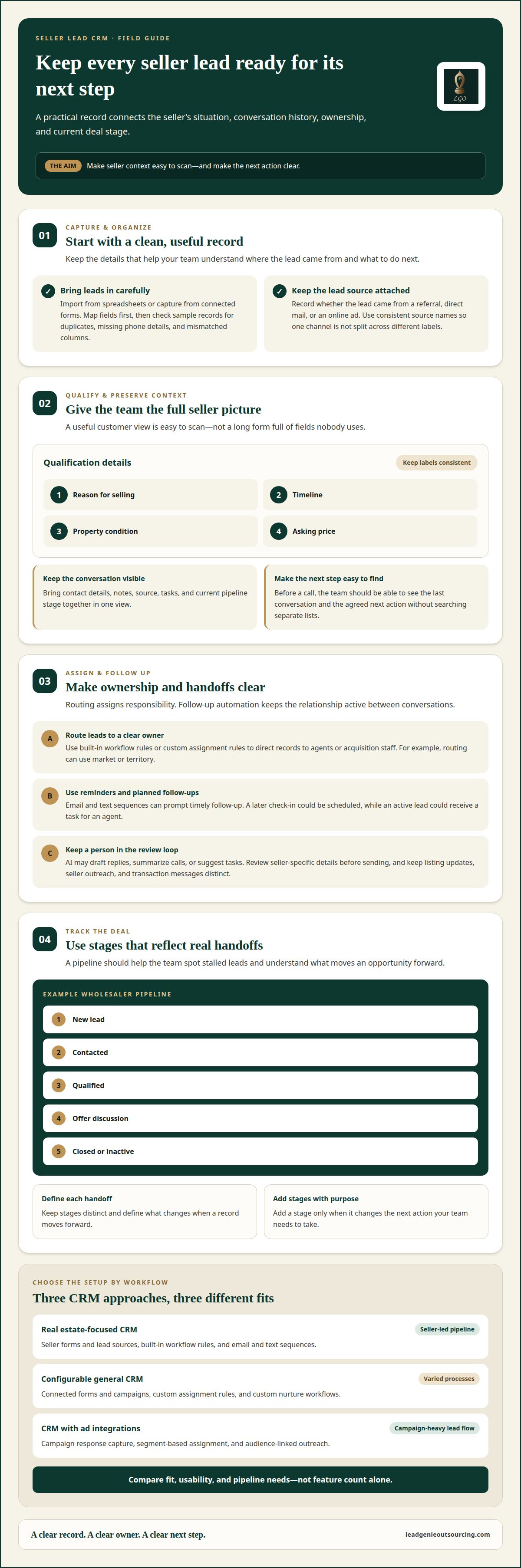
Real estate CRMs and configurable general CRMs can capture leads from web forms, calls, and campaign responses, then route records to agents or acquisition staff. The difference is how much setup each requires: a specialized system may be built around seller workflows, while a general CRM may need custom fields and rules. For example, route a listing inquiry by market or assign an investor lead by territory.
Email, Text, and AI Follow-Up
Email and text automation can send planned follow-ups after a seller responds or requests more information. AI tools may draft replies, summarize calls, or suggest tasks, but a person should review seller-specific details before sending. Routing assigns ownership; follow-up automation keeps the relationship active between conversations.
Automated marketing can group leads by source, interest, or pipeline stage, then send relevant campaigns. A seller who requested a later check-in could receive a scheduled email, while an active lead gets a task for an agent. Keep listing updates, seller outreach, and transaction messages distinct to avoid confusion.
Where supported, CRM integrations can connect lead segments with digital advertising tools to build or refresh audiences. This can align an ad campaign with lead status, but it doesn’t replace human review of audience data or message content. Use the integration to organize campaign records, then track responses in the CRM.
In the United States, privacy and contact rules depend on how lead information is collected and how outreach is sent. For TCPA or DNC questions, check with your attorney. Keep consent and contact preferences with the lead record, and use them when setting up calls, texts, and emails. Cold-calling compliance topics need attention alongside CRM workflow design.
Compare common setups by the work they handle, not just their feature count.
| Option | Lead capture | Routing | Follow-up | Best fit |
|---|---|---|---|---|
| Real estate-focused CRM | Seller forms and lead sources | Built-in workflow rules | Email and text sequences | Seller-led pipeline |
| Configurable general CRM | Connected forms and campaigns | Custom assignment rules | Custom nurture workflows | Teams with varied processes |
| CRM with ad integrations | Campaign response capture | Segment-based assignment | Audience-linked outreach | Campaign-heavy lead flow |
Choose a setup that captures lead sources cleanly, assigns ownership clearly, and supports follow-up your team will actually use.
Customer data and 360-degree customer views
A useful customer view brings contact details, source, seller needs, and activity into one record. A CRM for real estate seller leads should make this information easy to scan, not bury it in a long form. Customize the view around agents’ decisions, not every field the CRM can store.
Solo agents need a simple record they can update between calls. Teams need clear ownership and shared notes, while brokerages may need role-based access and views across agents. The right fit depends on who needs to see each lead and who owns the next step.
CRM costs vary by plan, user seats, feature access, integrations, and support. Weigh those costs against the ability to manage seller records, customize pipelines, and keep data usable as lead generation grows.
Lead Import and Qualification
Lead import brings seller records from sources such as spreadsheets or connected forms into the CRM. A spreadsheet import can add a batch at once, while form integrations can capture leads as they arrive. Map fields before importing, then check sample records for duplicates, missing phone details, and mismatched columns.
Qualification adds context to a record, such as reason for selling, timeline, property condition, and asking price. Those fields help an agent sort active sellers from early-stage leads. Use consistent labels across the team so “follow up” means the same thing to everyone.
Lead Source Management
Source tracking records whether a lead came from a referral, direct mail, or an online ad. Add the source during import or capture it through a connected form, then keep it attached to the contact as the lead moves through the pipeline. Unlike qualification fields, source labels show which campaigns and channels started the relationship.
For a CRM for real estate seller leads, consistent source names make reports easier to interpret. For example, a brokerage can compare referral records with online ad responses and review which sources produce leads that become active opportunities. Keep source names consistent. “Mail,” “direct mail,” and “postcard” should not split one campaign into separate reporting categories.
A 360-degree view should show the seller’s contact details, notes, source, tasks, and current pipeline stage together. For example, an agent opening a record before a call can see the last conversation and the agreed next step without searching through separate lists. Flexible layouts help solo agents prioritize fast updates and brokerages standardize shared fields.
Customize the real estate pipeline to reflect your actual handoffs. A wholesaler might track new lead, contacted, qualified, offer discussion, and closed or inactive. Keep stages distinct, define what moves a record forward, and add a stage only when it changes the next action.
CRM support matters when an import fails, an integration stops syncing, or staff need help with permissions. Compare support channels, setup guidance, and help documentation. A clear process for reporting data issues can help your team find missing leads before they disappear from daily work.
Common risks include duplicate records, incomplete imports, unclear ownership, and outdated contact details. Reduce them with a test import, consistent required fields, assigned lead owners, and routine record reviews. For instance, a team lead can review unassigned records during a pipeline check and assign an owner to each.
CRM integrations with real estate tools
A CRM is more useful when it connects seller lead generation with the tools your team already uses. Map each handoff first: website inquiry, contact record, agent task, offer discussion, and closing. Then check whether each integration passes the fields your workflow needs, such as source, contact details, and next action.
Start with your website. A seller form can send a new inquiry into the CRM, where the record receives a source label and an owner. For example, a form’s property-condition response can map to a CRM field. Review a test submission before launch. Check that names, phone numbers, and seller notes land in the right fields.
Phone and email tools can keep activity tied to the right contact. When call logs or emails sync with the CRM, agents can review prior conversations before following up. A missed call, for example, can prompt a callback task. Confirm that the sync matches the right person, especially when household members share contact details.
Calendar connections support a different step. They can place a scheduled conversation alongside the seller record, giving an agent one view of the appointment and its context. A meeting titled “property condition follow-up” is more useful than a generic calendar entry. Keep lead notes in the CRM so a changed appointment doesn’t erase key details.
Document and transaction tools matter later in the pipeline. When an opportunity moves toward closing, a connected e-signature or transaction platform may reduce duplicate data entry, if the CRM supports that connection. Set a clear handoff point. For example, move a record to “offer accepted” only when the team is ready to begin its transaction workflow.
Lead generation and advertising tools can also pass campaign data into a CRM. Use a consistent campaign name for a direct-mail response, website form, or online ad. Then review the lead source alongside later activity. This shows how an inquiry entered the system without treating a click or form submission as proof of seller intent.
Before enabling an integration, test it with a sample record. Check field mapping, duplicate handling, ownership, and what happens when a record changes. If a website form updates a phone number, for example, confirm that the CRM keeps the corrected value. Document who handles sync errors and how the team records the fix.
Integrations can reveal more activity, but access should match each person’s role. Give agents the records and tools they need, and limit unnecessary access to sensitive seller details. Review permissions when roles change. A brokerage with several teams may need different views from a solo operator, even when both use the same CRM.
Choose integrations based on the handoffs they remove, not the number of logos on a feature page. A practical setup connects the sources that generate seller inquiries, keeps conversations attached to records, and supports the move from first contact to closing. If a connection creates duplicate data or manual cleanup, it may not be helping.
CRM pipelines and deal tracking
A seller pipeline shows each opportunity’s status and next action. Deal tracking works best when stages match your actual process, from new inquiry through seller conversation, offer, contract, and outcome. Give every stage a clear meaning. Otherwise, agents may move similar leads differently and produce unreliable pipeline reports.
Start by mapping the handoffs your team already uses. For example, a wholesaler might use “new,” “contacted,” “qualified,” “offer discussion,” “under contract,” and “closed or inactive.” Treat these as workflow labels, not promises about a deal. Define the action that moves a record forward, such as completing a seller conversation or documenting an offer.
Keep lead status separate from task status. “Qualified” describes the seller opportunity; “call back” describes the next action. A qualified lead may still need a call, a property detail, or an offer discussion. Keeping these fields separate helps an agent see both the deal stage and the work still to be done.
Deal tracking should capture the details that guide decisions. Attach conversation notes, property information, offer terms, and the next follow-up task to the same record. For example, if a seller wants to revisit an offer after discussing repairs, record that context and assign the next task. The next person can pick up the conversation without relying on memory.
Use stage dates and activity history to identify stalled opportunities. A lead in “offer discussion” with no recent note needs a different review from a new inquiry awaiting its first call. Schedule regular pipeline reviews. Look for missing owners, overdue tasks, and records without a clear next step, then assign a specific action.
Pipeline reports are useful only when teams update records consistently. Agree on shared definitions for “contacted,” “qualified,” and “inactive.” If one agent counts a voicemail as contact and another waits for a conversation, the report combines different events. A short field guide in the software can help everyone use labels consistently.
Integrations support tracking when connected tools send activity to the right seller record. A call log, calendar appointment, or form response shouldn’t create a separate deal by mistake. Test each connection with a sample contact, then review how updates affect the owner, stage, and task. Fix mismatched fields before relying on pipeline reports.
A useful pipeline also has a clear exit for leads that aren’t moving forward. When available, record the reason, such as no response or seller timing. Keep inactive records distinct from active opportunities. That keeps the working view focused while preserving context if a seller reconnects later.
Choose software that lets your team adjust stages, fields, ownership, and reporting without making routine updates cumbersome. A solo operator may need a simple board and task list; a team may need shared ownership rules and pipeline views. The right setup makes each lead’s status, history, and next action easy to understand.
What are the best CRM platforms for real estate seller leads in 2026?
The best choice depends on how your team captures seller leads and moves them toward a deal. Compare platform types based on seller workflow, customization, integrations, and reporting, then test the fit against your actual process. A feature list alone won’t show whether agents can keep records current during a busy day.
Seller-focused CRM: This type centers on seller conversations and property opportunities. It may suit investors who need seller-specific fields and deal stages without building every step from scratch. Before choosing one, follow a sample record from first inquiry through offer discussion. Check whether the stages fit your process and agents can quickly find the next task.
Configurable general CRM: A general CRM can work for teams with established processes or varied lead sources. Its flexibility can support custom fields, ownership rules, and reporting, but setup takes planning. For example, create a seller record with source, property address, contact owner, and next action. Then see whether a new agent can understand the record without extra explanation.
Investor-focused CRM: This option is built around acquisition work rather than traditional listing management. It can suit wholesalers and investors tracking seller conversations, offers, and contract outcomes. Review the pipeline labels and stages. If your team moves from “new lead” to “offer” to “closed or inactive,” the software should support that path clearly.
Transaction-focused CRM: This type emphasizes work after a deal reaches a defined transaction stage. It may help teams coordinate documents and handoffs, but may be less suited to early seller nurturing. Test a sample opportunity at “offer accepted.” Confirm that the record still shows seller history and the tasks needed for the next handoff.
CRM with calling and marketing connections: This setup links seller records with outreach tools, campaign activity, or call history. It can reduce separate data entry when connections work as intended. Test a web inquiry and a logged call. Confirm that both appear on the correct contact and retain their source and notes.
Use the same test for each platform: enter a sample lead, assign an owner, record a conversation, create a follow-up task, and move the deal through your stages. Note where the process requires extra clicks or duplicate entry. A solo operator may value quick updates, while a brokerage may prioritize shared access and consistent reporting.
Choose the platform that handles your core seller workflow with the least friction. If your process changes often, prioritize flexible fields and stages. If lead capture is the weak point, focus on forms and source tracking. Keep your shortlist tied to real tasks, not feature claims your team won’t use.
Lead Genie Outsourcing
Lead Genie Outsourcing can help when your CRM is ready but seller conversations aren’t consistently reaching it. Its cold-calling service supports real estate investors and wholesalers who need dedicated outreach alongside lead tracking.
Use this approach when your team needs more seller conversations and a clear way to review each lead. Callers qualify leads around reason for selling, timeline, property condition, and asking price, with call recordings available for review. That gives your team useful context for deciding what follow-up belongs in the CRM.
If you want to discuss how cold calling could fit your seller lead workflow, book a free 30-minute call with Lead Genie Outsourcing.
Put Your CRM Workflow to Work
Test your CRM for real estate seller leads against an actual seller conversation. Can your team see the record, understand its status, and take the next step without searching through separate tools? That workflow test reveals more than another feature list.
Pick a lead source and follow a new record through your process. Note where someone must re-enter information, make a judgment call, or take ownership. Those handoffs show where your setup needs clearer rules or a better fit. Keep the workflow simple enough for consistent use, then refine it as your process changes.
If seller outreach is the gap, Lead Genie Outsourcing offers cold calling for real estate investors and wholesalers, along with LGO CRM. Talk through how those options may fit your lead process and what you need from your CRM.
Book a free 30-minute call with Lead Genie Outsourcing and take the next step with a clear plan.
Frequently Asked Questions
How can a real estate CRM benefit my agency?
A CRM can help your team spot patterns in seller activity and make decisions based on recorded outcomes. For example, review why opportunities were paused or declined, then adjust your outreach focus or acquisition criteria. It can also help managers assess workloads across active opportunities without relying on informal updates. The value comes from using records to guide decisions, not simply storing more information.
What features are essential in real estate CRM software?
Look for reliable search, duplicate detection, data export, and reports your team can understand. Search should make it easy to find a seller by name, property address, or phone number. Duplicate detection helps prevent treating the same homeowner as separate opportunities. Export options support recordkeeping, while reports should show managers what changed and where staff time is going.
What integrations should a seller-lead CRM support, such as MLS, IDX, and dialers?
MLS and IDX connections are most relevant to brokerages that manage listing data or property searches. Investors and wholesalers may get more value from a dialer or tools that capture seller inquiries. Match each connection to the work it supports. A brokerage managing listings has different integration needs from an investor tracking off-market seller conversations.
What CRM automation workflows work best for converting homeowners into listings?
For a brokerage, use each conversation’s outcome to set the next appropriate action. If a homeowner requests time before discussing a listing, record that preference and schedule the agreed follow-up. If the homeowner is ready to discuss representation, route the opportunity to the agent handling listing conversations. Investors and wholesalers should track seller discussions toward their own acquisition decisions, not listing conversion.
What privacy and compliance rules apply to storing and contacting seller leads in the United States?
Privacy and contact rules depend on how lead information is collected and how outreach is sent. Keep consent and contact preferences with each lead record and use them when setting up calls, texts, and emails; consult an attorney about TCPA or DNC questions.