

A free trial can look useful and still leave the key features locked. A real estate investor CRM trial is worth your time only if it lets you test the work your team actually does: track seller leads, move deals through a pipeline, and follow up across channels.
You already know a CRM needs to fit how you source and manage deals. The hard part is spotting the limits before you commit, not after you’ve moved your contacts and changed your workflow.
This comparison breaks down investor-focused CRM options by trial access, feature limits, pricing, setup fees, contract terms, and communication tools. It also explains what to test during a trial, including whether you can import contacts and follow up with real leads using the features in the plan you’re considering.
Use the comparison to narrow your options around your operation. A solo investor may need a different setup from a wholesaling team handling a steady flow of seller conversations. The right fit makes lead follow-up and deal tracking easier to manage without paying for features you won’t use.
Key Takeaways
- Match the CRM to your deal flow, contact types, and follow-up process, not just a feature list.
- Compare trial access by testing the features included in the plan you may choose.
- Review recurring charges, setup fees, and contract terms together to understand the full commitment.
- Assess how each platform handles contact records, deal tags, and seller communication in one workflow.
- Use the comparison to decide whether you need software alone or support with seller outreach as well.
What Makes a CRM Built for Real Estate Investors?
A real estate investor CRM should support the path from seller inquiry to deal follow-up. Compare trial access, contact capture, pipeline tools, and integrations before weighing the interface.
Free Trial Availability and Length
Trial access varies by software provider. Some offer a time-limited trial, while others provide a demo or free plan. Trial periods and access conditions vary, too. Compare the end date, included plan, and what happens when the trial ends. A trial is useful only if it lets you assess the work your operation needs.
Use the trial to test a real investor workflow. Check whether the software supports the features in the plan and lets you assess seller records, deal stages, and follow-up. Limited access may not show how the selected plan works in practice. Compare trial terms with the feature list, not as a standalone measure of fit.
Free Plans
A free plan differs from a trial because it may remain available after a set testing period. Its feature and usage limits determine whether it can support your operation. Review contact capacity, user access, pipeline functions, and integrations in the plan description. Don’t assume “free” means every feature is included or that the plan suits investor workflows.
Map one seller inquiry from capture through follow-up. Check whether the free plan supports each step, including a handoff to an agent or teammate. A plan that stores names but restricts workflow functions may suit basic record-keeping, not active deal management. Compare those limits with the trial access offered for paid plans.
Trials and Demos
A demo is a provider-led walkthrough; a trial gives you hands-on access. A demo can show how investors or agents might handle a task, but it won’t show how the software works with your records. Trial access can reveal workflow friction, provided the needed features and integrations are available.
Use a demo to understand the product’s intended workflow, then use trial access to test actual tasks. For example, follow a seller contact from initial capture to a follow-up task. User feedback can provide context, but it doesn’t replace testing the software against your own process.
| Option | Access | Best comparison point |
|---|---|---|
| Time-limited trial | Hands-on access for a stated period | Included plan features and end date |
| Free plan | Ongoing access with plan limits | Contact, workflow, and integration limits |
| Live demo | Provider-led product walkthrough | Investor and agent workflows shown |
| Agent-focused CRM | Plan or trial access varies | Fit for investor deal stages and seller follow-up |
Choose the option that lets you test your real workflow, not just view a polished demo.
CRM pricing, contracts, and setup fees
Compare the full subscription structure, not just the price beside a plan. Trial card requirements and cancellation rules vary by provider, so check when billing starts and how cancellation takes effect.
Pricing and Subscription Costs
CRM software may bundle contact storage, deal tracking, email tools, and support into one subscription. Other plans may charge separately for additional features or services. Compare the included tools with your actual workflow, such as capturing seller inquiries and tracking follow-up. A lower starting price may cover fewer functions, while a broader plan may include tools your team won’t use.
For a clear comparison, list each plan’s recurring charge, included features, and any separate setup costs. Keep subscription charges distinct from optional add-ons. This makes it easier to see how the advertised plan relates to your expected operating costs.
Per-User and Flat-Rate Pricing
Per-user pricing ties the subscription total to the number of people who need access. Flat-rate pricing charges a set amount for a defined plan, regardless of user count within its limits. A solo investor who later adds an acquisitions assistant, for example, may see a per-user plan cost change as access expands. A flat-rate plan may hold steady, but its user and feature limits still matter.
Compare the cost at your current team size and after the next likely staffing change. Confirm, too, whether every user gets the same access. Separate roles or permission tiers can affect how the CRM supports lead review and deal handoffs.
Monthly and Annual Pricing
Monthly billing spreads payments across the subscription period and can suit teams still assessing their workflow. Annual billing commits the business for longer, so consider the total commitment, not just the displayed monthly equivalent. Compare both options using the same plan, user count, and feature set. Otherwise, apparent savings may reflect different access rather than billing frequency.
Before choosing annual billing, match the renewal date to your operating budget and expected CRM use. For monthly billing, review the cancellation cutoff and next billing date. Those dates determine when a change takes effect.
Contracts and Setup Fees
Contract terms define the commitment period, renewal process, and cancellation conditions. Setup fees, when charged, may cover onboarding or initial configuration, and providers differ on whether these costs are separate from subscription charges. Read the order form and contract together, then note the total commitment, payment schedule, renewal terms, and any setup charge.
Ask what setup includes in practical terms, such as whether it covers importing contacts or configuring deal stages. A fee without a defined deliverable is difficult to compare with one tied to specific onboarding work. Use the same checklist for every provider.
Use the same comparison fields for each option: recurring billing, user limits, feature access, setup charges, renewal, and cancellation. Compare CRM pricing by total commitment and the tools your team will use, not the headline rate alone.
Contact management and communication tools
A useful platform connects contact management, seller communication, and deal records. During a trial, find out how contact imports work and whether imported leads can be tested through the actual follow-up process.
Contact and Lead Imports
A provider should explain which contact fields an import can bring in, how it handles duplicates, and whether records can be tagged by deal. Investor records may include sellers, buyers, agents, lenders, property managers, and contractors. A trial should let you import contacts and test the system by contacting and following up with real leads.
Use a sample record to check whether a seller’s name, property details, source, and notes stay together after import. Then see whether you can find and update the record without losing its deal context. This reveals more than a polished demo because it shows how the platform handles working data.
Deal and Property Pipelines
A deal pipeline shows where each opportunity stands, from a new seller inquiry to a later decision or outcome. Compare how the platform connects a contact to a property and a deal. A seller may own multiple properties, for example, so the record should make clear which property relates to each opportunity.
Check stage names, record history, and visibility of next steps. A pipeline that separates property status from seller follow-up helps teams see what needs attention. Use a CRM trial to assess whether those views match your team’s process, rather than forcing every lead into one generic track.
Team permissions and task management affect who can view records and who owns the next action. Compare roles for an acquisitions lead, caller, and manager. After a seller conversation, for example, the assigned task should show its owner and due step, while the manager can review the record without taking ownership away.
Brokerage and team management call for a different setup from a solo investor’s workflow. Agents may need shared contact records and clear handoffs, while investor teams may organize work around seller leads, properties, and deal stages. Compare how the platform separates team activity and keeps updates visible to the right people.
For multiple portfolios, check whether records can be grouped by business, market, or investment strategy. A seller lead tied to one portfolio shouldn’t be confused with a property tracked under another. Use the trial to compare filters and views, then see whether teammates can find the right records without mixing deal activity.
Communication tools should keep seller conversation history connected to the right contact and deal. Compare how the CRM records calls, messages, and follow-up tasks, and whether your team can see what happened before contacting a lead again. Teams making frequent outbound calls need clear records to preserve context and support smooth handoffs.
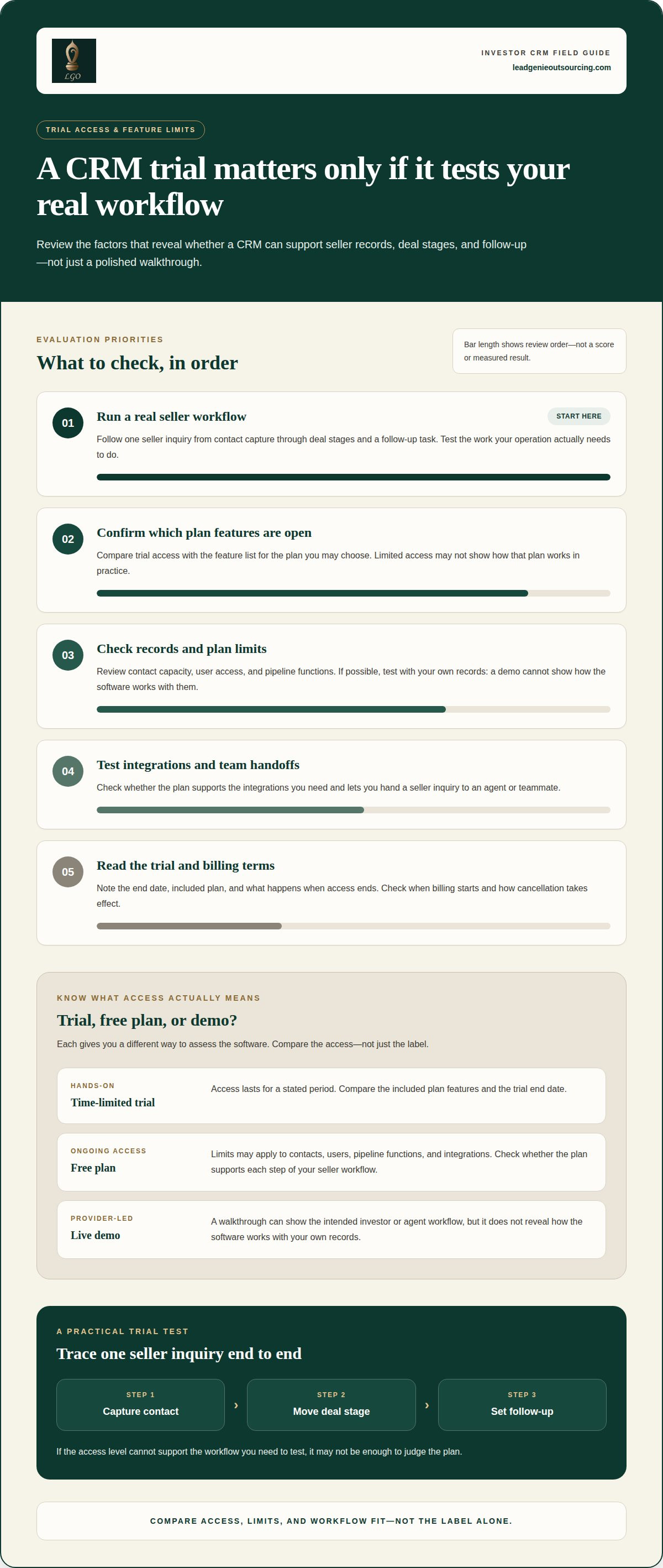
How to assess a provider’s real estate investor CRM trial access and feature limits
Investor CRM tools differ in how they capture leads, store property details, track deals, and automate follow-up. Compare those functions in the plan you’re considering, not just on a feature page.
Investor CRM Features
Investor-focused features connect seller records with property details and deal stages. During a trial, open a lead record and check whether it keeps the seller’s contact information, property address, lead source, and notes together. Then see whether the record links to the opportunity and its current stage.
Feature access matters. A trial should provide access to every feature included in the selected tier or plan. If property fields or deal views are restricted, you can’t assess the full workflow your team would receive with that plan.
Marketing and Sales Features
Marketing and sales tools support lead generation and follow-up. Compare how the platform groups leads for campaigns, records outreach, and updates contacts after a response. For example, a seller who replies to an email should remain connected to the right lead record and next task.
Check whether campaign features are included in the plan or require an upgrade. Then assess whether the CRM shows which contacts received outreach and what action followed. These details help distinguish a system built for active follow-up from one focused mainly on storing names.
Deal Tracking and Automation
Deal tracking shows movement from a new inquiry to later stages. Depending on the plan, automation can trigger a task or update when a record changes. Test a simple example: move a seller lead to a new stage and see whether the expected task or reminder appears.
Keep the test tied to a real process. If a teammate must review a seller response before the next contact, check whether the CRM makes that handoff visible. Automation should support the step without hiding who owns the follow-up or why it’s needed.
Compare providers using the same lead and workflow. This keeps feature limits visible, even when platforms use different labels for similar tools.
- Lead management: Can the record keep the seller, source, notes, and next task connected?
- Property data: Can the team link property details to the right contact and opportunity?
- Deal tracking: Can users see the current stage and the record’s history?
- Automation: Can a stage change create a useful task or update without obscuring ownership?
Finally, compare the features available during the trial with the plan’s feature list. A feature shown in a demo may belong to a different tier. A real estate investor CRM trial is useful when it lets you test the included lead generation, campaign, and deal workflows before deciding.
Real estate investor CRM
A real estate investor CRM should support the path from first seller contact to a closing decision. Its value comes from keeping lead details, property records, follow-up, and deal status connected as work moves between people. A contact database alone won’t show whether an opportunity is progressing or stalled.
Spreadsheets can become hard to manage when records need clear owners, follow-up tasks, and a history of deal activity. A CRM gives the team a shared place to maintain that context. But a complex platform can create extra work if it needs extensive customization before the team can use it.
Test a representative lead through the full process. Start with a seller inquiry, then follow it through outreach, property review, and a closing decision. Check that notes and status stay attached as the opportunity moves between stages. Review the record from another teammate’s view, too. That handoff shows whether the system supports shared work or leaves updates disconnected.
Migration also needs a clear process. Move active opportunities with their contact details, property information, and latest notes intact. Keep the existing workflow available while the team learns the new system and confirms the records are usable. This parallel approach helps prevent a live seller conversation from being lost during the transition.
Don’t judge a CRM by how quickly a blank account looks ready. Choosing a system without testing the full workflow can mean extensive customization before it fits your operation. Compare the configuration needed for lead stages, property details, and team handoffs. Fit matters more than a long feature list.
- Lead status: Can the team see what needs follow-up?
- Property link: Does each record point to the right opportunity?
- Ownership: Is the next action assigned to a clear person?
- History: Can a teammate understand the record without asking for a recap?
Choose the CRM that makes the answers visible across your full workflow. The right setup should help your team manage active prospects and move each deal toward a clear decision, not add steps between seller conversations and closing.
Lead Genie Outsourcing: Cold calling for real estate investors
Lead Genie Outsourcing supports investors and wholesalers who need seller conversations and a CRM to manage incoming leads. Dedicated cold callers work 40 hours a week, with each caller assigned 10,000 skip-traced, scrubbed records. The LGO CRM is free for 30 days.
Turn to cold calling for real estate investors when seller outreach needs consistent execution, or choose cold calling for real estate wholesalers when that’s your operation. Leads are qualified across reason to sell, timeline, condition, and asking price, with a call recording for review. The service guarantees 30 qualified seller appointments a month, or dialing continues free until that target is met.
Put the next decision to work
Choosing software matters only if it supports how your operation moves from outreach to a clear next action. Treat the real estate investor CRM trial as a decision point, not a finish line. Identify who owns incoming seller conversations, what handoff follows, and how your team will keep deal work moving. A good fit should make those responsibilities easier to manage day to day.
Keep the next decision focused. Identify whether the main gap is seller outreach, managing the conversations that follow, or coordinating both. Consider how a new lead enters your operation and who acts next. That context makes a workflow discussion specific and keeps the software decision tied to the work your team needs to get done.
You don’t need to solve every process issue at once. Start with the point where leads or handoffs lose momentum, then set a clear next step. Schedule a free 30-minute call with Lead Genie Outsourcing and move forward with a plan grounded in your operation.
Frequently Asked Questions
What features are essential in real estate CRM software?
Essential features preserve context and make the next action clear. Look for a record structure that connects a person, property, source, notes, and deal history. Then test search and filtering with realistic records. Can a teammate find every inquiry tied to one property without scanning unrelated contacts? Well-organized records keep useful details from getting buried.
Can real estate CRM help with lead generation?
A CRM can support lead generation by organizing incoming prospects, tracking outreach, and showing which follow-ups remain open. It doesn’t create seller interest on its own. A wholesaler, for example, can record a lead’s source, log contact attempts, and see which conversations need another touch. Cold calling is a separate way to reach property owners; CRM software helps manage the resulting lead records.
How can a real estate CRM benefit my agency?
A real estate agency can use a CRM to give agents a shared view of client conversations and property opportunities. This helps when a lead changes hands or an agent is away. A teammate reviewing an inquiry, for example, can see the last recorded action instead of starting the conversation from scratch. Set clear ownership for each record so shared access doesn’t blur responsibility.
Which real estate investor CRMs offer a free trial in the United States?
Lead Genie Outsourcing offers the LGO CRM, which investors can include in a US CRM trial comparison. Trial access varies across software providers, so compare the available plan, included features, and any account limits. A trial is most useful when it supports the tasks you need to assess, rather than showing a product walkthrough alone. Avoid assuming every provider offers identical trial access.
How long are free trials for real estate investor CRM software?
Trial duration is set by each software provider, so there’s no single period that applies across the market. Check the trial’s start and end dates, when billing begins, and whether access ends automatically. Use the available time to assess the records and workflows that matter to your operation. A focused, hands-on test can reveal friction if you follow one complete lead-to-deal process.
What does a real estate investor CRM trial include, and what features are restricted?
A trial may include access to a specific software plan, while higher-tier tools, user seats, or integrations may remain unavailable. Read the plan limits alongside the trial terms. Check whether you can export or retain trial data if you don’t continue. A trial that lets you view deal stages but blocks key actions, for example, won’t show how the full workflow operates.
How much do leading real estate investor CRMs cost after the trial?
Post-trial costs depend on the selected plan, user access, feature set, billing term, and any setup work. Compare the amount billed after the trial with the tools included at that level. Note renewal timing and any add-ons needed for your workflow, too. Don’t compare a basic plan with a larger team plan as though they provide the same access.
Which real estate investor CRM is best for wholesalers, rental property investors, and flippers?
The best fit depends on what each investor needs to track. Wholesalers may prioritize seller conversations and assignment stages. Rental investors may need clear records across properties and ongoing management tasks. Flippers may focus on acquisition, rehab progress, and resale milestones. Compare how easily each system represents your workflow, then choose one your team can keep up to date.